


You wouldn’t build a house without blueprints. So why launch a website without a plan? If you’re wondering how to plan a website, it starts long before you choose a template or publish your first page. Here’s a stat that should make you pause: visitors form an impression of your site in just 0.05 seconds, and customers are 88% less likely to return after a bad experience. That’s a brutally short window to get things right.
The good news? Most website disasters trace back to skipped planning, not bad design. When you map out your purpose, audience, structure, and content before touching a builder, you avoid expensive rework and confused visitors.
This guide walks you through seven practical steps to plan a website from scratch. Whether you’re launching a business site, portfolio, or online store, you’ll finish with a clear roadmap you can actually build from. Let’s get started.
Step 1: Define Your Website’s Purpose and Goals
Before you pick a color or write a single word, answer one question: why does this website exist? Everything downstream depends on this answer.
Think of your website’s purpose as its mission statement. Every page, button, and image should serve it. Without that clarity, your project drifts, and you’ll make design decisions based on gut feeling instead of strategy.
Start broad, then narrow down. Ask yourself:
- Is the site informational, or are you selling products?
- Do you want to generate leads, build brand awareness, or support existing customers?
- What’s the single most important action you want visitors to take?
Example: A local bakery might decide its primary purpose is driving online orders, with a secondary goal of showcasing custom cake work. That focus instantly shapes which pages matter most.
When I’ve planned sites for small businesses, the ones that struggled almost always skipped this step. They ended up with pretty pages that didn’t move the needle on anything.
Set Clear, Measurable Goals You Can Track
Vague goals like “get more traffic” are useless. You need SMART goals: Specific, Measurable, Achievable, Relevant, and Time-bound.
Instead of “increase sales,” try: “Generate 50 qualified leads per month within six months of launch.” Now you have something to track.
Tie each goal to a key performance indicator (KPI) you can measure in analytics:
| Website Goal | KPI to Track | Example Target |
|---|---|---|
| Increase traffic | Organic sessions | +30% in 6 months |
| Generate leads | Form submissions | 50/month |
| Boost sales | Conversion rate | 3%+ |
| Build engagement | Average engagement time | 2+ minutes |
| Grow email list | Newsletter sign-ups | 500 subscribers |
Write these down. This document becomes your anchor, the thing you check whenever a later decision gets fuzzy.
Step 2: Research Your Target Audience and Competitors
Your website isn’t for you. It’s for the people you want to reach. Understanding them deeply shapes every content and design choice you’ll make.
Start by mapping out your audience’s demographics, needs, pain points, and behaviors. What device do they use most? What problem are they trying to solve when they land on your site? What language do they use to describe it?
| Research Area | Questions to Answer |
|---|---|
| Demographics | Who are they? |
| Goals | What do they want? |
| Pain Points | What problems need solving? |
| Devices | Mobile or desktop? |
| Search Intent | What are they searching for? |
| Buying Stage | Awareness, consideration, or decision? |
Those gaps? That’s your opportunity to stand out.
This is also where you sharpen your unique selling proposition (USP), the reason someone should choose you over everyone else. Your site should reflect that difference clearly, from your headline to your tone.
Build a Simple Audience Persona
A persona turns abstract “users” into a real person you can design for. Keep it simple, one paragraph is plenty.
Example: Maya, a freelance designer aged 30-40, browses mostly on mobile, and wants quick portfolio inspiration without wading through fluff.
With Maya in mind, decisions get easier. Mobile-first layout? Yes. Long-winded intros? No. You now have a filter for every future choice.
Step 3: Map Out Your Sitemap and Core Pages

A sitemap is the structured hierarchy of your pages, the blueprint for how everything connects. It defines your navigation and helps visitors find what they need fast.
A well-organized site boosts usability and keeps people from bouncing in frustration. A messy one buries your best content three clicks deep.
Start by listing your core pages. Most sites need:
- Home, your first impression and traffic hub
- About, who you are and why you’re credible
- Services or Products, what you offer
- Blog or Resources, content that attracts and educates
- Contact, how visitors reach you or convert
Next, group related pages into logical categories and set the hierarchy. Your homepage sits at the top, main sections branch below it, and subpages nest under those.
Tip: Sketch it as a simple tree diagram on paper or in a free tool like Whimsical or FigJam. Seeing it visually catches confusing structures early.
Don’t forget to plan for growth. Leave room for new service pages, blog categories, or an online store down the line. A sitemap built only for today gets awkward fast.
Step 4: Plan Your Content and SEO Strategy
Your sitemap is the skeleton. Content is the muscle that actually convinces people to act.
Go page by page and decide what each one needs to say. For every core page, plan the:
- Key message, the one thing a visitor should take away
- Call to action, what you want them to do next
- Proof, testimonials, case studies, or data that build trust
Then layer in SEO. Do keyword research to find the terms your audience actually searches, and map a primary keyword to each page. Your services page targets one intent, a blog post targets another. Don’t make two pages compete for the same term.
Here’s something people forget: a website is a living entity, not a set-it-and-forget-it project. Your content strategy needs a maintenance plan baked in from the start.
| Page | Primary Keyword | Search Intent | CTA |
|---|---|---|---|
| Home | Digital marketing agency | Commercial | Contact Us |
| Services | Local SEO services | Transactional | Request Quote |
| Blog | How to plan a website | Informational | Read More |
| About | About ABC Agency | Navigational | Meet the Team |
Decide now:
- Who is responsible for updating content?
- How often will you review and refresh it?
- How will you measure content performance?
Build an editorial calendar for ongoing content like blog posts and guides. This is what keeps you ranking and relevant long after launch. Investing here pays dividends in engagement, search rankings, and your bottom line.
Step 5: Sketch Your Layout and Design Direction
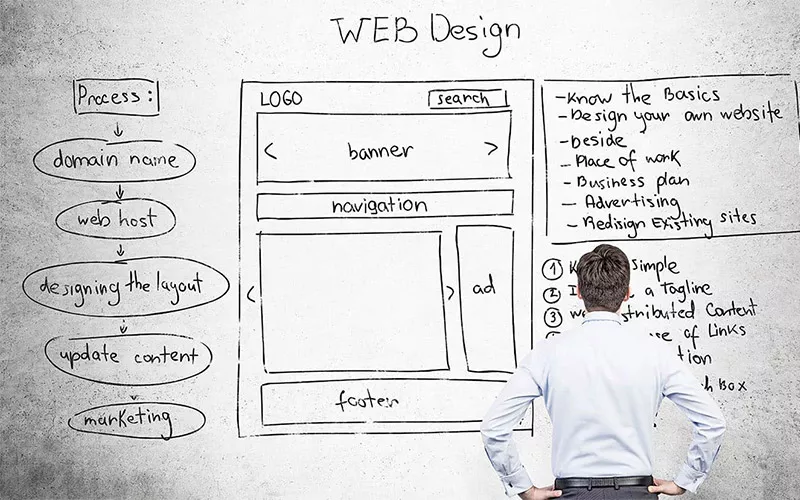
With structure and content planned, it’s time to figure out how your site will look and feel. This stage is a key part of how to plan a website because design, user experience (UX), and branding all work together to shape the visitor’s experience.
Here’s the thing: great design isn’t just about looking pretty. It’s about creating an intuitive, seamless experience that reinforces your brand and guides visitors toward your goals.
Start with low-fidelity wireframes for your key pages. These are rough sketches, boxes and labels, that map where things go. Skip colors and fonts for now. Focus purely on structure and flow.
When you wireframe, prioritize:
- Clear navigation that never leaves visitors guessing
- Mobile responsiveness (most traffic is mobile now)
- Easy scanning with headings, whitespace, and short blocks
- Accessibility so everyone can use your site
Once the layout feels right, define your visual direction. Nail down your logo, color palette, typography, and imagery style, all consistent with your brand identity.
Pro tip: Build a simple brand style guide documenting these choices. It keeps every future page looking cohesive, whether you design it or hand it to someone else. I’ve seen sites fall apart visually just because nobody wrote the rules down.
Step 6: Choose Your Domain, Platform, and Hosting
Now for the technical decisions. These three choices shape your site’s performance, cost, and how easy it’ll be to manage.
Your domain name is your address and part of your brand. Keep it:
- Memorable and easy to spell
- Short where possible
- Reflective of your brand, with a main keyword if it fits naturally
Your platform is how you’ll actually build the site. Your main options:
| Option | Best for | Trade-off |
|---|---|---|
| Drag-and-drop builder (Wix, Squarespace) | Beginners, speed | Less flexibility |
| CMS (WordPress) | Flexibility, scale | Steeper learning curve |
| Custom code | Full control | Requires dev skills or budget |
Match the choice to your budget, technical skill, and how much you expect to grow.
Your hosting keeps the site online. Look for reliable uptime, strong security, and responsive support. Cheap hosting that crashes during a traffic spike costs you more than it saves.
If you’d rather keep everything under one roof, integrated platforms like GoDaddy bundle a domain, website builder, and AI-powered tools like GoDaddy Airo, which streamlines setup for beginners. Whatever you pick, make sure it can scale with your goals.
Step 7: Prepare for Launch and Ongoing Maintenance
The work isn’t over when the site goes live, in many ways it’s just beginning. A solid launch and maintenance plan is what separates a site that thrives from one that quietly rots.
Before you launch, test everything:
| Task | Status |
| Test forms | ✓ |
| Check internal links | ✓ |
| Optimize page speed | ✓ |
| Add meta titles | ✓ |
| Submit XML sitemap | ✓ |
| Connect Google Analytics | ✓ |
| Connect Google Search Console | ✓ |
| Test mobile responsiveness | ✓ |
Don’t skip the SEO basics either. Set up meta titles and descriptions, add alt text to images, submit an XML sitemap, and connect analytics so you can track those KPIs from day one.
Then plan your launch push:
- Social media, tease it, then share the link on launch day
- Content marketing, publish a post explaining the why behind your site
- Paid ads, a targeted Google or social campaign to drive early traffic
- Outreach, tell partners, influencers, and relevant publications
After launch, treat maintenance as routine. Schedule regular backups, keep your CMS, themes, and plugins updated for security, monitor performance, and review content regularly using your analytics. A website needs ongoing attention to stay secure, relevant, and effective.
Conclusion and Next Steps
You now have a complete framework for how to plan a website: define your purpose, know your audience, map your structure, plan your content and SEO, design intentionally, choose the right tools, and prepare for launch.
Here’s your next move: turn this plan into a project checklist with tasks, owners, and deadlines. That checklist becomes your roadmap from idea to live site.
Remember, a website plan isn’t bureaucracy, it’s the anchor you return to whenever a decision gets tricky. Invest the time upfront, and you’ll build faster, avoid costly rework, and launch something that actually works.
Now go bring your idea to life. The planning’s done, the building starts today.
Frequently Asked Questions About Planning a Website
What is the first step in planning a website?
The first step is defining your website’s purpose and setting clear, measurable goals. Identify why the site exists—whether to inform, sell, generate leads, or support customers then establish SMART goals (Specific, Measurable, Achievable, Relevant, Time-bound) tied to KPIs you can track in analytics.
How can I plan a website that appeals to my target audience?
Research your audience’s demographics, needs, pain points, and preferred devices. Build a simple audience persona—one paragraph describing a real person you’re designing for. Then study 3–5 competitors to understand their strengths, content types, and gaps, sharpening your unique selling proposition.
Why is a sitemap important when planning a website?
A sitemap is the structured page hierarchy that defines your navigation and helps visitors find content quickly. It boosts usability, reduces bounce rates, and prevents burying valuable content too deep. Start by listing core pages (Home, About, Services, Blog, Contact), then group them logically and plan for future growth.
How should I approach content strategy when planning a website?
Map key messages, calls to action, and proof elements to each page. Perform keyword research and assign primary keywords strategically to avoid page competition. Build an editorial calendar for ongoing updates—blog posts, guides, refreshes—and decide who maintains content, how often to review it, and how to measure performance using analytics.
What should I test before launching my website?
Test across all devices and browsers, validate form submissions, check every link for dead ends, and run page speed checks. Set up meta titles, descriptions, alt text for images, and submit an XML sitemap. Connect analytics from day one to track KPIs and monitor performance immediately after launch.
What does website maintenance involve after launch?
Ongoing maintenance includes regular backups, keeping your CMS and plugins updated for security, monitoring performance metrics, and reviewing content regularly using analytics. Plan social media promotion, content refreshes, and periodic optimization to keep your site secure, relevant, and effective long-term.


